AizaMD™ docs
Install AizaMD and learn every module: Ambient Mode SOAP notes, Schedule, CliniChat, CareTeam Connect, Snippets and EHR/EMR integration.
19guides
- 7 sections
- Updated July 3, 2026
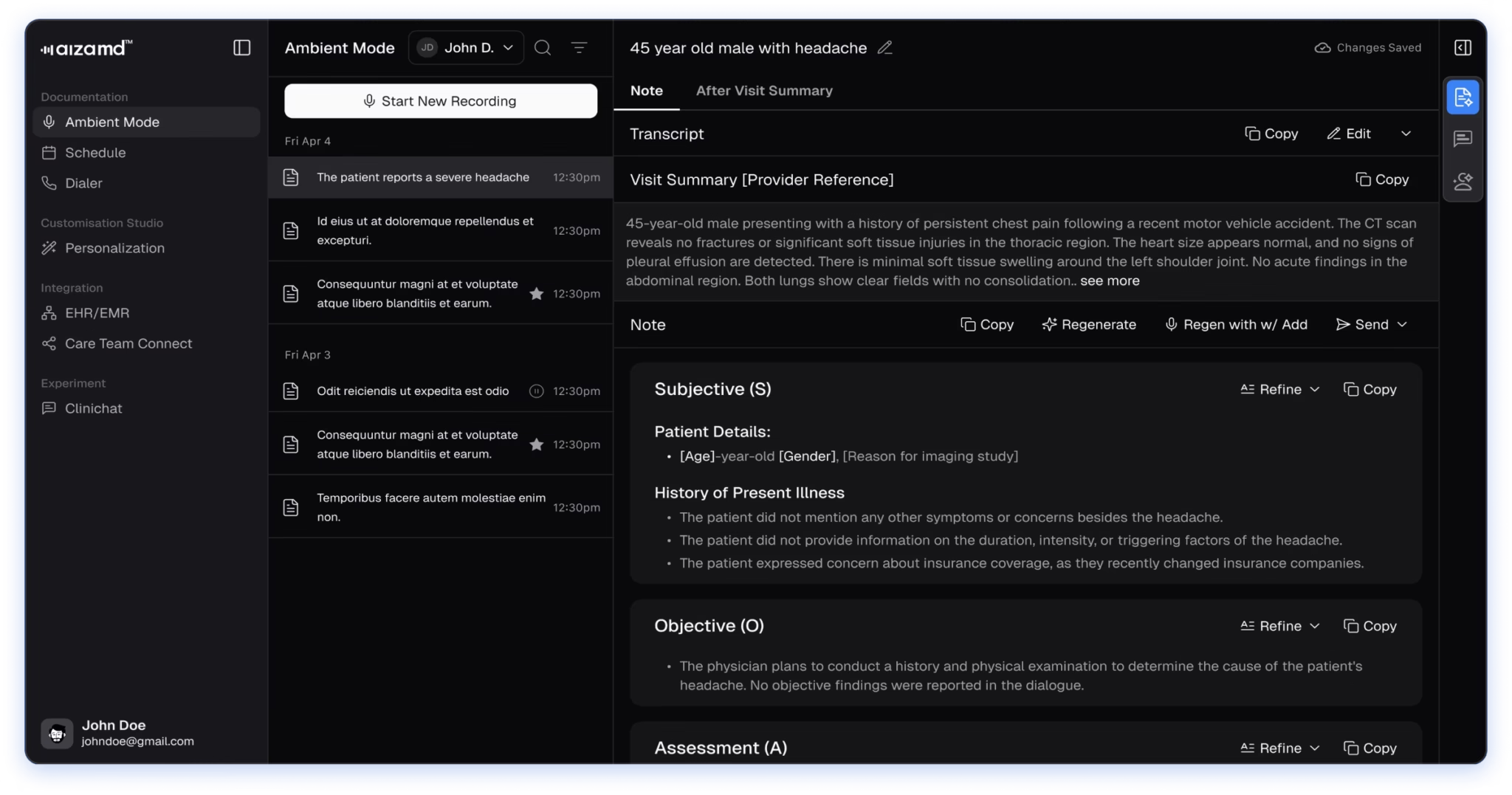
What the guides cover
AizaMD is ambient clinical documentation that turns clinician-patient conversations into accurate draft notes. Its modules bring together Ambient Mode SOAP notes and after-visit summaries, Schedule, CliniChat, CareTeam Connect, Snippets and CliniEnhance smart suggestions, with EHR/EMR integration.
AizaMD drafts notes for the clinician to review and sign. It is documentation support, not a medical device, and does not make clinical decisions.
Get StartedCreate your account, sign in with institutional SSO, and set your specialty and note-format preferences.3 guidesAmbient ModeRecord a visit and draft SOAP notes with ICD-10 and CPT code suggestions, then manage, regenerate, search and share them.7 guidesScheduleBrowse EHR appointments by date and send completed notes back to your EHR.2 guidesCliniChatAsk practice-specific questions, review chat history, and upload images for multimodal answers.1 guidesCareTeam ConnectShare note access with colleagues by invitation, and approve, deny or revoke access.2 guides
Start and get the app
Every guide, in order
Read them top to bottom the first time: each guide hands you on to the next.
- Create Your AccountSign up from aizamd.ai or the web app, activate via the magic-link email, and set your password with OTP verification.Get Started
- Sign In with Institutional SSOIf your institution has single sign-on (SSO) enabled, you can authenticate through your institution's portal instead of a password.Get Started
- Set Up Your AccountPick your specialty, care settings, CliniEnhance, and note-format preferences on first login.Get Started
- Create Your First SOAP NoteRecord a visit, generate the transcript with ICD-10/CPT codes, review the SOAP note and After Visit Summary.Ambient Mode
- Manage & Regenerate NotesDelete notes, refresh a note's structure with Regenerate, or refine sections with Regen with Add.Ambient Mode
- Search, Filter & Share NotesFind notes by keyword, mark favorites, filter the list, and share via email or WhatsApp.Ambient Mode
- Smart Suggestions (CliniEnhance)Generate Critical/Important/Recommended suggestions, apply or skip them, and review the rationale.Ambient Mode
- CliniChat in Ambient ModeOpen the CliniChat panel inside Ambient Mode for contextual AI responses.Ambient Mode
- Change the System ThemeSwitch AizaMD between dark and light mode.Ambient Mode
- Troubleshooting RecordingsWhat to do when note generation fails or the connection drops mid-recording.Ambient Mode
- View & Manage AppointmentsBrowse EHR appointments by date and work them through Not Started → In Progress → Completed.Schedule
- Send Notes to Your EHRPush a completed note back to the connected EHR from the Send menu.Schedule
- Use CliniChatAsk practice-specific questions, review chat history, and upload images for multimodal answers.CliniChat
- Invite Your Care TeamShare note access with colleagues by email invitation.CareTeam Connect
- Manage AccessRevoke access and approve or deny pending collaboration requests.CareTeam Connect
- Create SnippetsBuild voice-triggered text snippets with Verbatim, Replace, or Enhance integration modes.Snippets
- Add Snippets with AIDescribe a snippet in plain language and let AI draft it.Snippets
- Use Snippets in Ambient ModeSay 'Insert Template [Snippet Name]' while recording to drop snippets into the note.Snippets
- Connect Your EHRLink Epic, Cerner, Athena, ECW, ModMed and more; verify status and disconnect when needed.EHR/EMR Integration